 Search
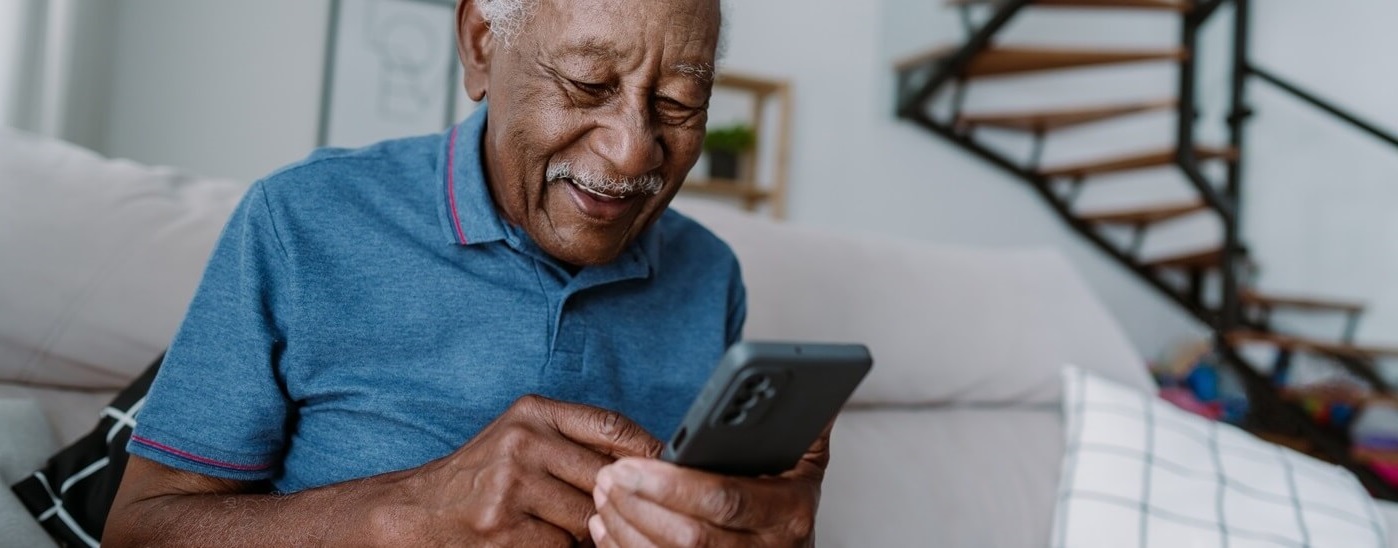
Stay connected with family, friends and your healthcare team – at no cost to you.
Elevate Medicare Choice (HMO D-SNP) members with a qualifying condition are eligible for a no-cost smartphone with unlimited talk, text and data* plan through our partner, Thrive Mobile.
About the Thrive smartphone:
- No monthly bill - save up to $300 a year
- Your free personal smartphone – you can even keep your current phone number
- Schedule appointments, view lab and test results or message your provider
- Connect with your care manager and FlexCard benefits
- Receive personalized health check-ins right on your phone
- The Thrive mobile phone is not a government phone
First 10GB of mobile data at high speed; speeds reduced to 128 kbps after 10GB.

Get Your Thrive Mobile Smartphone in Three Easy Steps
- Check Your Eligibility
Call Thrive Mobile at 1-888-508-8543 to find out if you qualify.
Hours: Monday–Friday, 8 a.m.–5 p.m. If DHMP doesn’t show you as eligible based on prior claims, ask your provider to complete the attestation form. - Complete Enrollment
A Thrive Assistant will guide you through the enrollment process. It takes less than 10 minutes. You can also sign up for Thrive by yourself, with a broker or with a care manager at Thrivemobile.com. - Unbox & Get Connected
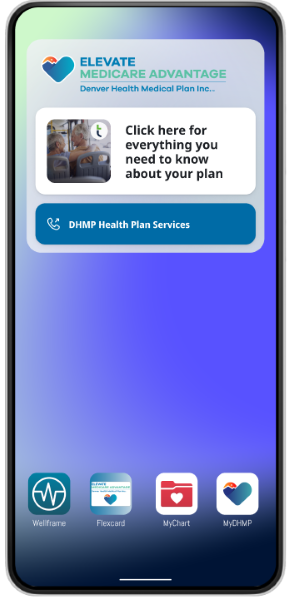
Your new smartphone will be shipped directly to your home with your health plan resources preloaded for easy, one-touch access.
Your New Smartphone Just Arrived!
Watch an instructional video for step-by-step instructions on how to set up and begin using your new Thrive smartphone.
English
Español
Members Receive
- Smartphone with 6.5"+ screen (including Gorilla Glass screen to prevent scratches)
- Device charger
- Device case
- Unlimited talk, text and data* plan
Thrive Mobile uses the T-Mobile network to give you service - Thrive assistants — a service that provides one-on-one help with technology. You can call 1-888-445-1069 to get support
Enrollment FAQs
After members join the Elevate Medicare Choice (HMO D-SNP) plan and are determined eligible for the benefit, someone from Thrive will call them in about 10 to 14 business days. A Thrive Assistant (someone from their customer service team) will walk them through the online form. It takes less than 10 minutes.
If a member does not have internet, that’s okay! Members can choose to fill out a paper form instead. The Thrive Assistant will explain how to fill it out and where to send it using a prepaid envelope.
You can also sign up for Thrive by yourself, with a broker, or with a care manager at Thrivemobile.com.
SSBCI stands for Special Supplemental Benefit for the Chronically Ill. It is a type of benefit offered with the Elevate Medicare Choice (HMO D-SNP) which helps members qualify for certain benefits, such as the Thrive phone. Not all members qualify. Eligible conditions include chronic alcohol and other drug dependence, autoimmune disorders, cancer, chronic heart failure, dementia, diabetes, end-stage liver disease, end-stage renal disease (ESRD), severe hematologic disorders, HIV/AIDS, chronic lung disorders, chronic and disabling mental health conditions, neurologic disorders, stroke.
If a member is not pre-approved by DHMP based on claims data, members can speak to their provider to ensure they qualify and get the provider attestation submitted.
An approved provider attestation allows access to both the Thrive and FlexCard SSBCI benefits.
Yes, members can keep their current phone number when they get their new device. A Thrive Assistant can help with the transfer.
Moving the phone number to Thrive (called "porting") usually takes between 30 minutes and 24 hours, depending on the previous phone company. Members don’t need permission from the previous phone company, just the account number.
Thrive Mobile does not pay to cancel the old phone plan or pay off any remaining balance on the previous phone company.
Yes, members can use their own phone with the Thrive network. A Thrive Assistant can help add important contacts, websites, and apps to the phone, if needed.
Note: Members using their own device will not receive check-ins.
If at any point the member changes their mind and wants the Thrive phone, they can get one.
Thrive Mobile can still help them get free wireless service by using a program called the Federal Lifeline Subsidy. A Thrive Assistant can help with signing up.
Thrive can also help members download our CareHub app, which has all the digital tools for DHMP in one place.
The member will need to provide their full name, home address, current phone number, email (if they have one), the last 4 digits of their Social Security number, and their date of birth.
It is helpful to have a valid email but if members do not have one, Thrive Assistant can help them create one.
Shipping FAQ’s
Devices are sent straight to members’ homes or any address members provide during the enrollment process. Once the device leaves the warehouse, the tracking info is sent to the member's email listed during enrollment.
Members can also call Thrive Assistants to track their device.
A signature is not needed. If a member is worried about where their device will be sent, we can send it to a trusted shipping center nearby or to a friend or family member's address.
The Thrive mobile phone should arrive within 5-7 days. Members with a future start date who have enrolled in the benefit should have phones at their home 2-3 days prior to their effective date.
Please contact Thrive Assistants for assistance.
Ongoing Support FAQ’s
Thrive Assistants are here to help from 8 a.m. to 5 p.m. Mountain Time, Monday through Friday. They work in the US and can give members one-on-one help with any tech questions.
If needed, Thrive Assistants can even connect to the member’s device to help finish a task. This makes it easier for members to use their phones.
Thrive Mobile is available in English and Spanish. If members need help in another language, we can use Language Line, which supports 140+ languages, to connect them with a Thrive Assistant
Denver Public Libraries offer a variety of resources for members to learn new technology skills, from classes to one-on-one help. Learn more about technical help members can get from Denver Public Libraries.
Privacy FAQ’s
Thrive does not keep or have access to individual member data. As a licensed wireless provider, Thrive looks at overall activity on the network to keep things running smoothly.
Thrive shares only group data about how the service is used with DHMP for Elevate Medicare Choice (HMO D-SNP) members. No personal or individual data is tracked or shared. Thrive also does not track where the device is located or what sites are accessed.
Thrive Assistants can help members set up facial recognition or a passcode to keep their phone safe. Any app on the phone will ask for a username and password, but that’s controlled by the app, not Thrive.
Mobile Device FAQ’s
Yes, Thrive phone supports TTY mode, which helps people who are hard of hearing. It's a feature found in the phone's accessibility settings.
If a member loses, breaks, or has their device stolen, they can choose to use another device. Thrive will give them a SIM card at no cost to keep their wireless service.
Members can also buy a new device from Thrive for about $170. The device will be sent right to their home.
After 30 days of no usage the service will be suspended. Thrive will try to outreach after 15 days of no usage and will attempt outreach three times. After 45 days of no usage the phone number assigned to the phone will be lost. The service can be reinstated by calling Thrive Assistants directly and maintaining eligibility for benefit.
If the member chooses not to use the phone anymore, please call DHMP Health Plan Services at 303-602-2111 to update the phone number on file.
The Thrive phone will have important healthcare resources such as:
- Phone number for DHMP Health Plan Services
- MTM (free transportation benefit)
Apps
- Wellframe (to talk with a Care Manager securely)
- Elevate FlexCard
- MyChart
- Link to the DHMP Plan Benefits website.
It will also have other DHMP benefit/plan details. We want to make sure members get the most out of the plan!
This is member’s personal phone and can be used however the member wants. Members can download apps, save photos, add contacts, and use the phone for everyday needs. Thrive Mobile and DHMP do not monitor how members use the phone and cannot access it after enrollment.
Yes! A Thrive Assistant can help members make the text bigger so it’s easier to read. If members need more help, the Thrive Assistant can connect to their phone and do it for them.
Thrive Assistants can also help set up a feature called TalkBack, which reads aloud what’s on the screen.
Yes, members can connect their hearing aids to the device. Not all hearing aids work with the phone, but most Bluetooth hearing aids do. The member or their caregiver can call a Thrive Assistant, who will help them connect the hearing aids.
Each month, members get 10GB of high-speed data, which is enough for most people to stream videos and use apps.
If members use all the high-speed data before the month is over, members can still go online, listen to music, and have telehealth visits—but things might be a little slower. If members need more high-speed data, they can buy extra for an added cost by contacting Thrive Assistants.
We want to make sure members get the most out of their Thrive benefit. Here are a few simple ways to get the most out of the data:
- Use Wi-Fi when possible.
Connect to Wi-Fi when you’re at school, work, the library, or other places that may offer available Wi-Fi. Connecting to Wi-Fi will reduce the amount of your cellular data used. - Limit use of cellular data by using Wi-Fi during data-heavy actions.
It uses a lot of cellular data when downloading games, movies, music, or updates onto the device or when conducting video calls. Use Wi-Fi when downloading resources onto the device, streaming, or making video calls. - Close apps not being used.
Many apps keep using data in the background even when you are not actively using the phone or the app. - Use “data saver” mode.
Many phones have a data saver setting that helps save data.- If you have a Moto G Play device, you can turn on “Data Saver” on by going to: Settings > Network & internet > Data Saver > toggling the switch to “On”
- If you have a TCL device, you can turn on “Data Saver” on by going to:
- Settings > Connections > SIM cards & mobile network > Data usage > Data saver > toggle the “Use data saver” switch to “On”
- If you have a Schok Volt device, you can turn on “Data Saver” by going to:
- Settings > Network & Internet > Data Saver > toggle the switch to “On”
- If you have an iPhone device, you can turn on “Low Data Mode” by going to:
- Settings > Cellular > Cellular Data Options
International Travel FAQ’s
Thrive Mobile does not have plans for international travel. If members travel outside the U.S., we suggest they use WhatsApp to stay in touch, and we can help set it up. If a member gets an international SIM card, they will lose their phone number after 60 days of non-usage (required by FCC). If a member plans to do this, they must call Thrive to have their phone suspended (which allows them to keep the number) and then call Thrive back once they are home.
Disenrollment FAQ’s
Our goal is to give all Thrive members free, ongoing service. If a member leaves the Elevate Medicare Choice (HMO D-SNP) plan, they will still have service for 30 days. At the start of these 30 days, Thrive will ask if the member wants to join Lifeline (if they haven’t already). Lifeline is a national program that helps Medicaid members get wireless plans for free or low cost. If the member joins Lifeline, their service will keep going without any breaks.
Members can also choose to pay Thrive directly to keep their plan. If they don’t join Lifeline or pay, their service will stop after 30 days.
Important: Members should be careful when changing plans, because there are only a few times a year they can switch back to DHMP.
No. Once issued, the phone is the member's to keep.
*The smartphone benefit offered with the Elevate Medicare Choice (HMO D-SNP) plan is part of a special supplemental program for the chronically ill. Not all members qualify. Eligible conditions include chronic alcohol use disorder and other substance use disorders (SUDs), autoimmune disorders, cancer, cardiovascular disorders, chronic heart failure, dementia, diabetes mellitus, overweight/obesity/metabolic syndrome, chronic gastrointestinal disease, chronic kidney disease (CKD), severe hematologic disorders, HIV/AIDS, chronic lung disorders, chronic and disabling mental health conditions, neurologic disorders, stroke, post-organ transplantation, immunodeficiency and immunosuppressive disorders, conditions associated with cognitive impairment, conditions with functional challenges, chronic conditions that impair vision/hearing (deafness)/taste/touch/smell, and conditions that require continued therapy services in order for individuals to maintain or retain functioning.
For more information or questions about qualifying conditions or if you have one of the above chronic conditions and are new to DHMP, call us at 303-602-2111, toll-free 1-877-956-2111.